Before you can create an XRechnung, you must enter your supplier data in the Xpert-Timer configuration.
The payee should inform you which fields are mandatory for you.
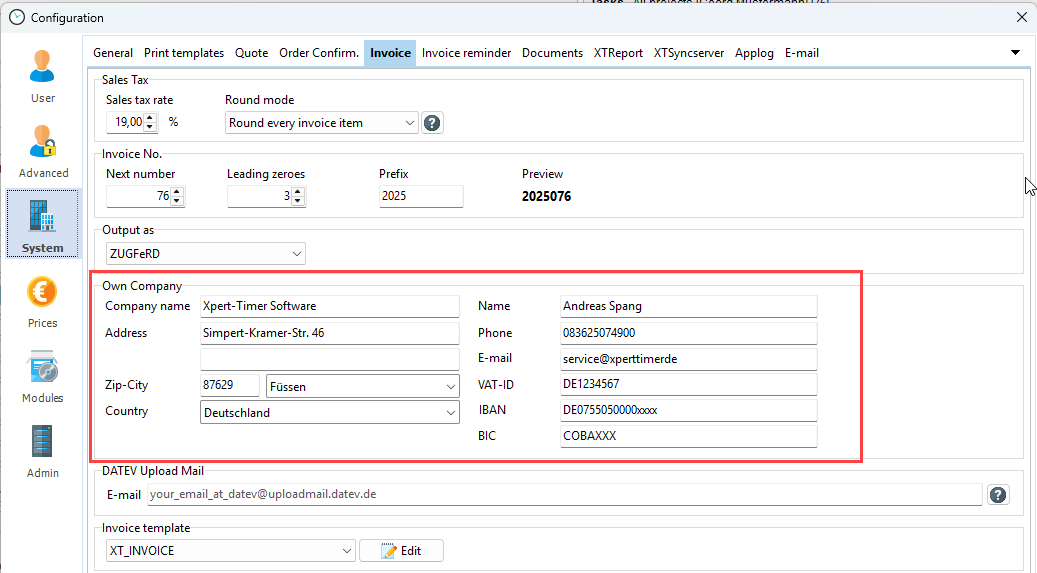
In most cases, the recipient's routing ID must be specified in the XRechnung or ZUGFeRD. You will find the field for this in the customer details. You can also obtain this information from the payee.

The XRechnung is currently required by authorities in Germany. From 2027, it will be mandatory for all businesses.
The XRechnung consists of an XML document, while the ZUGFeRD format is a combination of a PDF document and an accompanying XML file. Select the desired format when creating an invoice.

The XRechnung is always sent as an email with an XML attachment. You can open and view the document in the email preview, but editing it there is difficult because the XML format is not easy to read. Click OK in the email dialog box to open your default email program for editing.

You can generate the ZUGFeRD invoice and output it as a ZUGFeRD PDF. This is the only way to embed the corresponding XML in the PDF file. You can also attach attachments (PDF documents) to the ZUGFeRD or XRechnung. When printing the ZUGFeRD or XRechnung format, the files are then embedded in the XML.
