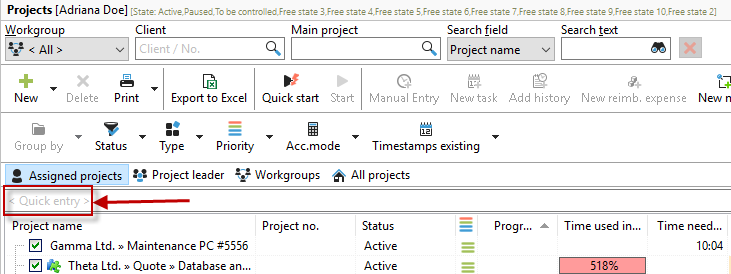
Intelligent quick entry will save you a lot of time when creating your projects, tasks, and timestamps.
Why smart?
Xpert-Timer recognizes the information you enter in quick entry and attempts to assign it accordingly.
 Quick entry for projects
|
Enter the name of the project you want to create here. Please note that the project is always created under the main project that is currently activated in the Xpert-Timer Project Manager with the mouse and highlighted in blue. In the following example, a new project called "Telephone Support" is created under the main project "Support" because the selected project is also located in the main project Support.
|
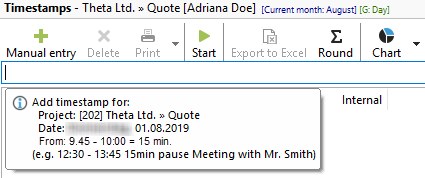
Quick entry for timestamps

|
Project selection when creating using quick entry
|
Xpert-Timer always creates the timestamp for the project that is selected in the project list with the mouse and highlighted in blue.
|
The following input formats are recognized:
1000-1125
|
From 10:00 a.m. to 11:25 a.m.
|
10:00 - 11:00
|
From 10:00 a.m. to 11:25 a.m.
|
|
|
1000-1125 Emails written
|
From 10:00 a.m. to 11:25 a.m., comment: Emails written
|
Yesterday 8:00 a.m. to 9:00 a.m. Seminar
|
Addendum for yesterday from 8:00 a.m. to 9:00 a.m. with comment: Seminar
|
|
|
Remote maintenance Mr. Meier
|
If only a comment is entered in the quick entry, the corresponding project is started when you press the Enter key. This allows you to directly record a time stamp with a comment.
|
|
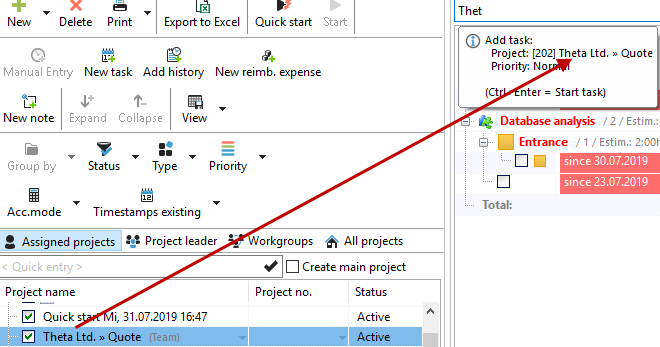
Quick entry for tasks
|
In the task area, quick entry also accesses the selected project in the project list, which is highlighted in blue.
When entering data, keywords such as:
tomorrow, yesterday
|
Task due date: tomorrow or yesterday
|
04/01/2012
|
Task due date: 01/04/2012
|
|