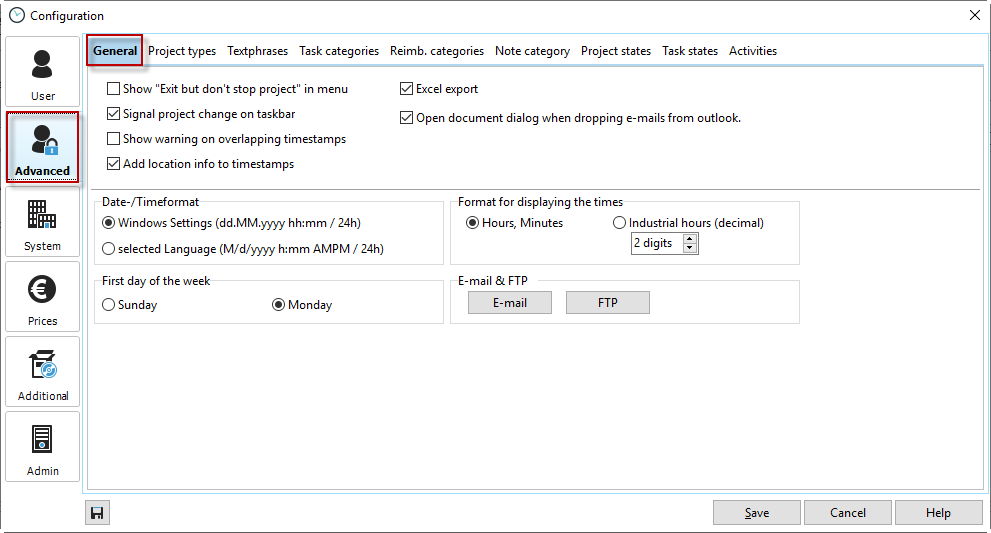
Display "Exit and continue counting" |
Display another option for exiting Xpert-Timer. This allows you to close the program but continue counting time. One use case would be when you are traveling by plane. You have to turn off your laptop and cannot turn it back on until you arrive. Xpert-Timer continues to run in the background during this time. |
Signal project change in the info area |
A brief note in the toolbar when you switch or exit a project. |
Warning for overlapping timestamps |
If you are recording times and want to avoid overlapping timestamps, activate this option. A warning will then be displayed when overlapping timestamps are recorded. |
Record location information for timestamps |
In Xpert-Timer Mobile, you have the option of recording GPS data for the timestamp. When the data is synchronized, it will appear in the "Location" column in your timestamp list. Of course, you can also manually enter a location for your timestamp if this is useful in your case. |
Activate Excel export |
Activate this option to see all menu items for Excel export. If you do not use Excel export, we recommend hiding the menu items. |
Open document dialog when dragging and dropping emails from Outlook |
You can also save Outlook emails as documents in your Xpert-Timer document management system. If you do this regularly, we recommend activating this option. This allows you to quickly and easily save your emails in the document management system. |
Display format for times |
Choose whether you want to display the times in your Xpert-Timer in hh:mm format or in decimal hours. Please note that rounding differences may occur when displaying in industry hours. |
Email & FTP |
Enter your connection details for your email and, if necessary, your FTP account here. |
Regional settings |
Specify where the country-specific settings (date, time, currency) should be retrieved from. |
First day of the week |
Select here which day the week begins with. |
Spell check |
Here you can select the dictionary for your spell check or activate spell checking for your text fields, such as comments, notes, etc. |